


How To Delete Your Account On TransferXO | Full Guide
Introduction:
Deleting your account on TransferXO is a significant decision and one that should be approached with careful consideration. Whether you've decided to explore other financial platforms or simply wish to discontinue your association with TransferXO, this step-by-step guide will walk you through the process of permanently deleting your account.
TransferXO, as a cryptocurrency exchange platform, handles valuable assets and sensitive information, so it's crucial to follow the correct procedures to ensure the security of your funds and data.
In this comprehensive guide, we will provide clear instructions for both the web and mobile versions of TransferXO. You'll learn how to navigate the necessary steps, from accessing your account settings to confirming your decision, and ultimately, ensuring the successful deletion of your TransferXO account.
Before proceeding, it's essential to note that deleting your TransferXO account is irreversible, and any cryptocurrency funds or data associated with your account may be permanently lost. Therefore, we recommend carefully reviewing your account, withdrawing any remaining funds, and considering your choice thoughtfully.
Now, let's embark on the journey of deleting your TransferXO account, starting with the web version of the platform.
Why Delete Your TransferXO Account?
There are several reasons why individuals might choose to delete their account on TransferXO, a cryptocurrency exchange platform. Here are some common reasons along with explanations for each:
1. Security Concerns:
- Some users may have concerns about the security of their TransferXO account due to potential vulnerabilities or breaches. They might decide to delete their account to safeguard their assets and sensitive information.
2. Changing Financial Goals:
- Cryptocurrency investments and financial goals can change over time. Users who have shifted their investment strategies or financial priorities might find it necessary to close their TransferXO account to reallocate their assets elsewhere.
3. Dissatisfaction with Services:
- Users may be dissatisfied with the services, features, or customer support provided by TransferXO. Such dissatisfaction could lead them to seek alternative platforms and delete their TransferXO account. In this event we will love to talk to you. Feel free to contact any of our customer service agents who are available 24/7. We will be more than happy to help solve whatever issue you may have with the platform.
4. Privacy Concerns:
- Some users might have privacy concerns related to the collection and usage of their personal information. Deleting their account can help mitigate these concerns by removing their data from TransferXO's systems.
5. Reducing Exposure to Cryptocurrency:
- Cryptocurrency markets can be highly volatile and risky. Users who want to reduce their exposure to these risks may choose to exit the crypto market entirely by deleting their TransferXO account.
6. Consolidating Investments:
- Investors who manage multiple cryptocurrency accounts across different platforms may decide to consolidate their holdings for easier management. Deleting redundant accounts, including TransferXO, can simplify their financial portfolio.
7. Account Inactivity:
- Some users may have created TransferXO accounts but never actively used them. In such cases, they might choose to delete their inactive accounts to reduce clutter and minimize security risks.
8. Financial Planning Changes:
- Changes in personal financial planning or investment strategies may lead users to close their TransferXO accounts to align their financial actions with their current objectives.
9. Platform Transition:
- Users who are transitioning to a different cryptocurrency exchange platform or financial service may decide to delete their TransferXO account to streamline their financial activities.
10. Security Incidents or Concerns with TransferXO:
- In the event of a security incident or data breach involving TransferXO, users may choose to delete their accounts as a precautionary measure to protect their assets and information.
Step By Step Guide to Delete Your TransferXO Account
Web Version:
Step 1: Access TransferXO Website
- Open your preferred web browser (such as Google Chrome, Mozilla Firefox, or Safari).
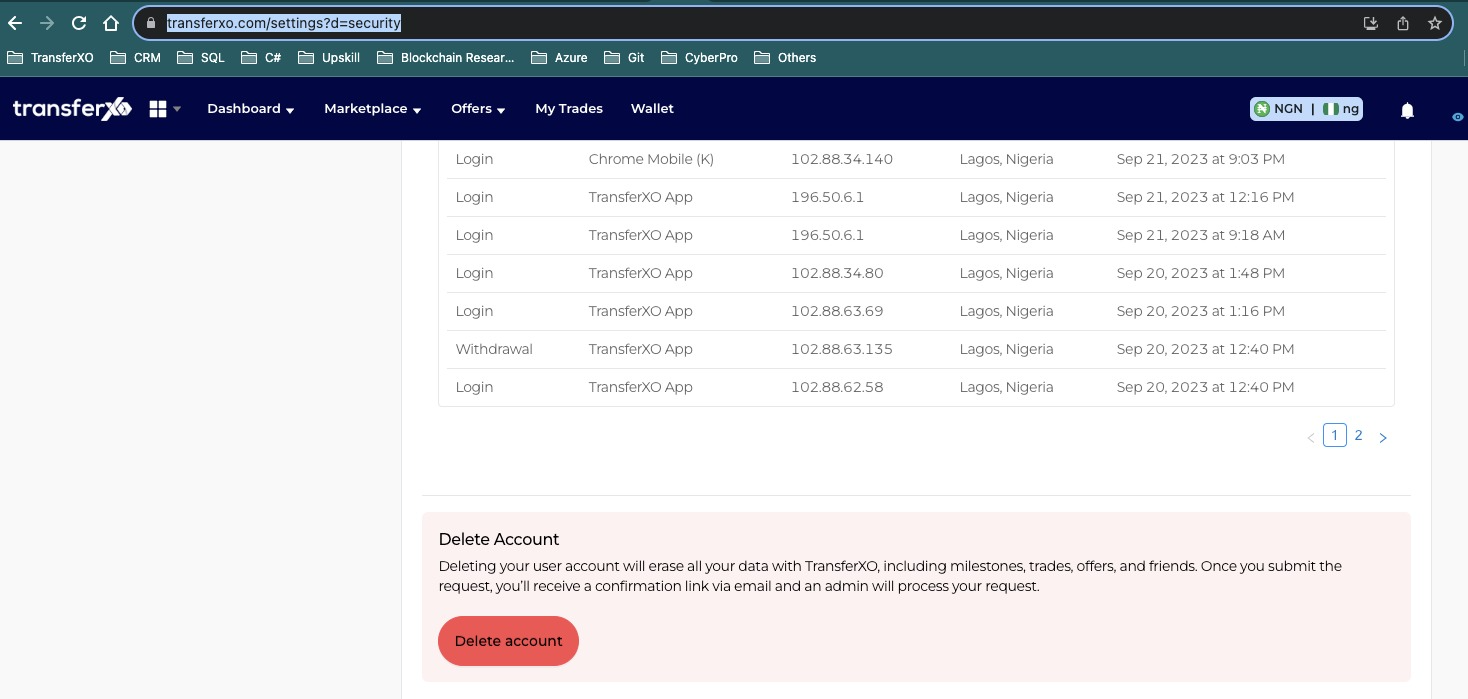
- In the address bar at the top, type "https://www.transferxo.com/settings?d=security" and press Enter to go to the TransferXO website.
Step 2: Locate "Delete Account" Option
- Once you are on the TransferXO website, scroll down the webpage. Look for an option called "Delete Account." This option is usually found within your account settings or profile settings.
Step 3: Log In
- If you are not already logged in, you will need to log in to your TransferXO account. Look for the "Log In" or "Sign In" button on the top-right corner of the website.
- Enter your username and password to access your account.
Step 4: Initiate Account Deletion
- After logging in, click on the "Delete Account" option. This action will prompt a confirmation window to appear.
Step 5: Confirm Deletion
- In the confirmation window, TransferXO will require you to confirm your intention to delete your account to ensure it's not an accidental action.
- You will need to type a confirmation code or word, which is often "DELETE" (all caps) to proceed with the account deletion.
- Follow any additional on-screen instructions, if provided.
Step 6: Final Confirmation
- Confirm the deletion of your account. You may receive a final confirmation message indicating that your account has been successfully deleted.
Mobile Version:
Step 1: Open TransferXO App
- Unlock your smartphone and locate the TransferXO app icon. Tap on it to open the app or log on to “https://transferxo.com/” on any of your mobile browser.
Step 2: Access the Side Menu
- In the TransferXO mobile app, you will typically find navigation options in a side menu. This menu is often represented by three horizontal lines or a hamburger icon located in the top-left or top-right corner of the screen. Tap on it.
Step 3: Navigate to "Settings"
- Within the side menu, you should see various options. Look for and tap on "Settings."
Step 4: Open "Privacy and Security"
- Inside the "Settings" section, you will find different settings related to your TransferXO account. Locate and tap on "Privacy and Security."
Step 5: Initiate Account Deletion
- In the "Privacy and Security" section, you will find the option to "Delete Account." Tap on this option.
Step 6: Confirm Your Decision
- TransferXO may ask you to confirm your decision to delete your account to prevent accidental deletions.
- You will likely need to type a confirmation code or word, such as "DELETE" (in capital letters), as a final confirmation of your intent.
Step 7: Final Confirmation
- Confirm the deletion of your account. You will receive a final confirmation message indicating that your account has been successfully deleted. Then, You'll be redirected to this page after your account is deleted
Important Note:Deleting your TransferXO account is a permanent action, and you may lose access to any funds or data associated with your account. Ensure that you have withdrawn any remaining funds and have considered your decision carefully before proceeding.
Conclusion
It's important to note that regardless of the reason for wanting to delete a TransferXO account, users should take appropriate precautions, such as withdrawing their funds and ensuring compliance with any withdrawal and account closure policies outlined by TransferXO.
Additionally, users should consider consulting with financial advisors or professionals before making significant changes to their cryptocurrency investments or financial strategies.
Keep in mind that the specific steps and interface may vary slightly based on updates or changes made to the TransferXO platform. If you encounter any issues or have questions during the account deletion process, it's advisable to contact TransferXO's customer support for assistance.